One thing that I’ve learned during my first semester as a doctoral student is that I really don’t know too much about how the brain works. But I also don’t know too much about how my car works either and I’m okay with that as well. As long as both of them work, I’m good.
But what I’ve enjoyed this semester is learning about how the brain works. My undergrad degree is in psychology because I love learning about how people think, why they think that, and how that affects their behavior. In fact, I think that’s one of the reasons why I enjoy working with my middle schoolers. It’s like living within a social experiment. Every.single.day. But I bring that up because one of the assignments in my Multiple Perspectives in Teaching and Learning (MPLT) class is to review two websites that are supposed to help train your brain. As I went through the various exercises for both sites, I was intrigued…interested…motivated…and definitely engaged. At the end of the first phase for Lumosity, I even received feedback on how I ranked among people of the same age. Talk about feeding into my competitive streak! If I didn’t have to go to bed, I probably would have done those exact same exercises again just to see if my percentages would have gone up.
In reviewing both sites (Lumosity and Brain HQ), I have to say that I’m impressed with the individualized learning components. Lumosity supports individualized learning as you fill out a basic profile before starting the exercises in order to give you a score based upon people in your like age-group. Brain HQ does not use personal information, but rather from the get-go uses performance to determine components of the activity. I didn’t get far enough to see if or how my scores compared to other users.
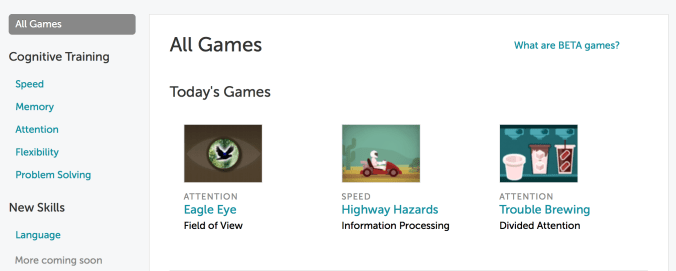
It’s interesting to use technology in this type of format. I’ve used brain teasers that are book-based but I did not receive immediate feedback nor was I moved to different levels based on my performance but rather based on choice…not that I was deterred (remember, my competitive streak?). However, immediate feedback is something that technology can provide which is motivating to the learner.
 I’m intrigued by the idea of using technology for game-based learning. The points, levels, and options to unlock other levels is definitely motivating. If I didn’t have to go to work this morning, I would have unlocked one more level for sure! The fact that I’m even intrigued by both of these sites is a testament to their ability to engage the learner. Believe me when I say that I am not a fan of video games. I’m terrible…just ask my brother. Expect for Pole Position. I rock at that game…you can ask my brother about that as well. I feel it’s helped to make me the driver I am today. 😉
Lumosity and Brain HQ adapt to the user’s performance. In both games, the speed and complexity increased when I did well and decreased when I did not. Lumosity gives immediate feedback (yay!) but I didn’t advance far enough in BrainHQ to see if there was an immediate feedback component. In fact, the “spot the different bird” game was a bit frustrating to me because I didn’t know why sometimes only a few birds appeared when I clicked versus a whole flock. Or was that supposed to represent feathers? Did the whole flock…er feathers…mean I correctly spotted the wrong bird? Who knows.
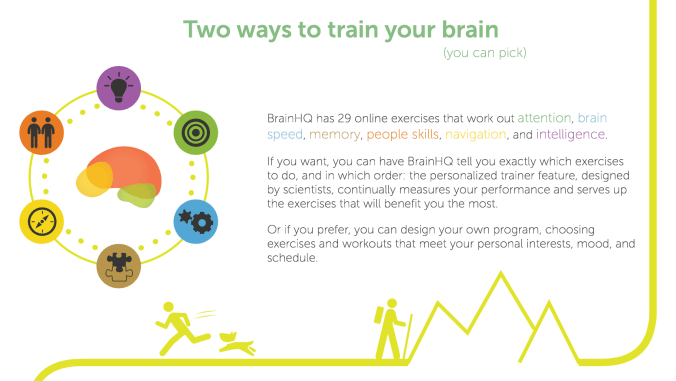
Anyone who has attended my PD sessions knows that I’m a fan of free stuff. As an educator, I have no problem spending money on my classroom, my students, or my own professional growth. But I prefer free stuff. Both Lumosity and Brain HQ are limited free…which is nice.
In evaluating the physical space for learning…because students use devices to access these sites, I don’t foresee any space issues. However, some students might find it too distracting to use either of these sites with the regular hum of classroom noise. I would suggest students use earbuds to block out the noise but also cardboard barriers to lessen visual distractions.
I believe sites like these are a valuable enrichment tool, especially for gifted learners, although across the spectrum I suppose these sites could be useful for all learners. In fact, students who suffer from low-efficacy may be encouraged by using adaptive learning sites.
I believe that video games have a place in learning. In fact, games that are historically based could help students visualize and remember historical content but having not seen or used any video games for learning in my own classroom, I cannot attest to its true value. But I do see video games as another avenue for learning. If the goal is to find something that interests, motivates, or engages students, I think educators need to be open to a wide variety of options. Educators cannot use their fear of the unknown or bias against their perceived value of technology to automatically write off video games as a viable tool for learning.
#trainyourbrain #gamebasedlearning #yourbrainisamuscle

 Living the Learning Curve