#InnovatorsMindset Part 1

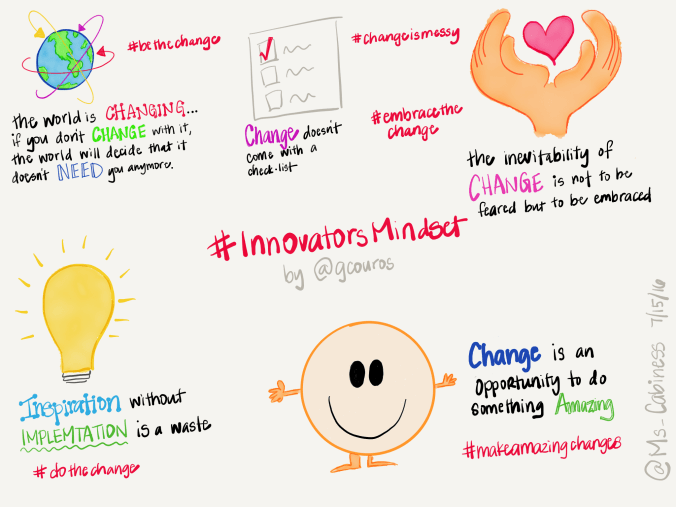
Have you ever tried sketchnoting with a puppy on your lap? Well, I have. It wasn’t easy but my drive to finish at least one sketchnotes from Chapter 1 of George Couros’ book The Innovator’s Mindset: Empower Learning, Unleash Talent, and Lead a Culture of Creativity was the driving force to press forward inspite of the cuteness that just wanted to snuggle.

I finished The Innovator’s Mindset yesterday evening and I’d be lying if I didn’t admit that I was a bit forlorn. I loved being immersed in how to create, hone, and honor an Innovator’s Mindset. George Couros (@gcouros) has the gift of writing because the whole book was like sitting down next to a good friend and having an insightful conversation about education. I found myself answering his questions…adding my own thoughts…even nodding and smiling along as he explained how to cultivate an Innovator’s Mindset into my professional practice.

As I began reading, I found myself highlighting what seemed like every other sentence – his pearls of wisdom are THAT good – which made me think, “How am I ever going to narrow all of this down into one comprehensive sketchnotes?” But then I thought, “Why limit myself to just one sketchnotes?” There are so many good things to keep in mind and best practices to instill into my daily routine that the learning would be lost if I tried to shove everything into just one sketchnotes. So, what I’ve decided is that I’ll create a sketchnotes for each chapter…highlighting George’s pearls of wisdom along with my own understanding of what constitutes an Innovator’s Mindset as a reflection piece for myself.

Now I’m on summer vacation…enjoying the beauty and relaxation that goes along with #lakelife so it might take me awhile to get all of the sketchnotes done. But there’s no rush…in fact, I truly believe that one cannot rush creativity or the creative process. So I plan to thoroughly enjoy the freedom to take things (all things) one.day.at.a.time.

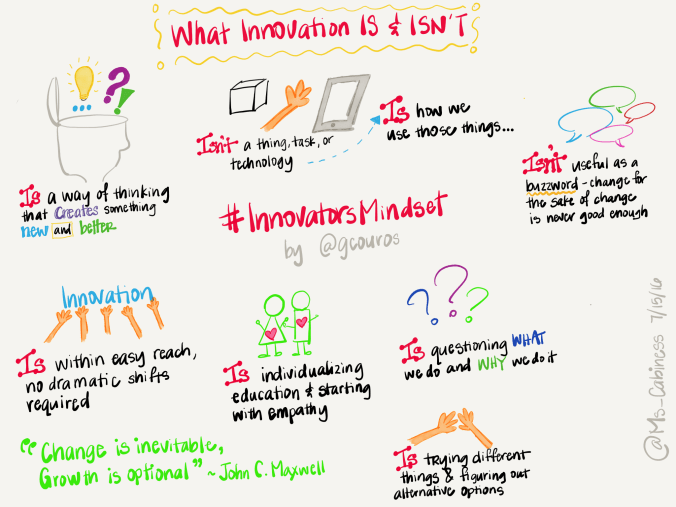
I managed to finish two sketchnotes this morning (with the puppy on my lap the ENTIRE time). I don’t claim to be an artist, I’m really more of a doodler…but here is my understanding as gleaned from The Innovator’s Mindset: Empower Learning, Unleash Talent, and Lead a Culture of Creativity. Enjoy!

Introduction
IMG_0005

Chapter 1: What Innovation Is and Isn’t
IMG_0006

Closing Shop & Movin’ On…

As this school year came to a close, I decided that this summer I would finally learn how to use Word Press for blogging. It started yesterday when I found myself with a huge block of time where I could play around with the various features of Word Press. Easy UI it is not. But the overall presentation when all is said and done is very nice. It helps that the template I chose for that site is named for one of my favorite authors: Hemingway.

Now that I’m up and running with Word Press, it’s time to say good-bye to an old friend…my first professional blog “Tech is the New Black”…I’d be lying if I didn’t admit that I’m a bit sad at moving my blog to a new site, but it’s time. I’ve been using this site to share my thoughts on education and technology integration for several years now. In fact, my first post was February 17, 2011 appropriately titled My Nemesis. I’d like to admit that technology ceased to be my nemesis over the years but I’ve found that with the increased integration of technology into my curriculum it served to open up new opportunities for technology to throw a wrench in the whole learning process. There were days (in the not too distant past) where I had to use pranayama breathing (kinda sounds like Darth Vader) so that I wouldn’t lose my mind. But if one wants to use technology, one quickly learns that you have to take the good with the bad (er, challenging).

I want to thank those of you who have read my blog posts over the years. I wrote them in part to share the triumphs and challenges of using technology but this blog was also cathartic in many ways. It helped me to see my growth over time as I overcame various technology hurdles and barriers. The new blog “Emerging Tech Notes” will continue to serve both purposes. The new UI is out of my comfort zone, so I apologize ahead of time if the blog posts, images, or anything else is out of whack. Just chalk it up as part of the learning process.

With much appreciation and fond memories, I bid “Tech is the New Black” adieu as I move forward in my learning journey at my new site “Emerging Tech Notes“.

Catch ya on the flip side!

A Time to Reflect

“We do not learn from experience…we learn from reflecting on experience.” – John Dewey

Screen Shot 2016-07-01 at 10.40.16 PM

This year my department rolled out a fully blended learning program for both World and U.S. History. Each member of my department was given an iPad cart to use with our students. We met over the summer to design our courses using Haiku Learning as our learning management system. The conversation flowed as we threw out ideas about how to make learning more student-centered while staying true to our philosophy of providing a rigorous learning environment with student choice. Integrating technology at this level with varying degrees of techxpertise (thanks @MisterCoyle for the nomenclature) was certainly something that kept us on our toes all.year.long. It forced our department to take collaboration to the next level. On a regular basis (i.e., daily, before school, in between classes), we discussed how technology could help our students practice historical thinking, reading, and writing skills. Luckily, we are all veteran teachers who know the value of flexibility and having an open-mind. Because in the end it’s the students who benefit from all of this work…we’re just the care-takers of the process.

Top 10 Things We Learned This Year

  1. BaiBoard is a awesome app for collaboration – to make it easier to follow along (and hold students accountable), have students fill in a Google Form with their BaiBoard name + password; use the desktop app to monitor progress
  2. Google My Maps though it has great potential in the history classroom, the UI on the iPads is still severely lacking – it’s a bummer to have students create slideshows on a pin only to have it show up on some iPads but not others #csuftcs
  3. Padlet is an easy way for students to display their work – to prevent cheating or stealing of ideas, we found that it was better to require students to post their work first in a discussion forum in Haiku Learning to time/date stamp the entry and then post the assignment in Padlet
  4. District’s default password for GAFE accounts needs to be changed right away – birthdays are a big deal at the middle school level…hence it’s pretty easy to figure out the default GAFE password (mmddyyyy) #duh
  5. Haiku Learning is an easy way to create a blended learning environment for students – use a linear format (e.g, Task 1, Task 2) because it helps students know what to do next and they can progress through the tasks at their own pace
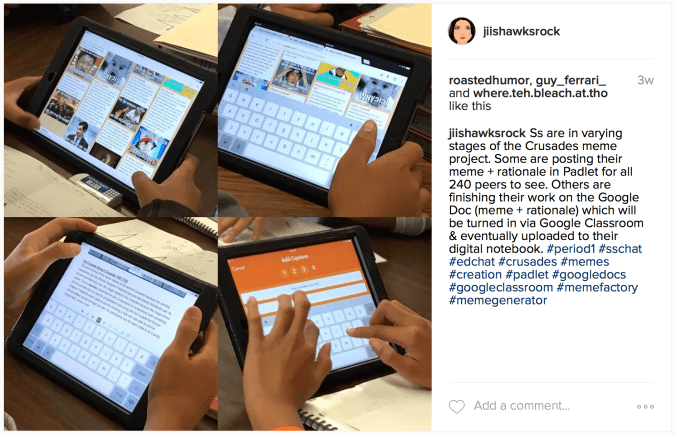
  6. Memes are a fun way for students to practice critical thinking skills – students not only used memes for historical writing but also to demonstrate their creative side; middle schoolers speak memes #truestory #funnestprojecttograde
  7. Student choice is one way to personalize the learning process – using a revised version of Marzano’s learning scales, students were able to chose their learning path: Level 3 (describe/define), Level 4 (analysis), Level 5 (synthesis, evaluation) #leveledlearning #studentchoice
  8. Collaboration is key – having an open-mind is just as important
  9. Technology will work when it wants to, not when you want it to #murphyslaw
  10. Middle schoolers are inherently curious and to a large extent fearless – give them a challenge and they will rise to the occasion…how do you think we’ve learned various tips and tricks of the apps that we use?