I think that sometimes educators underestimate students’ desire to learn and better themselves. And I’m including myself in that mix. But I’m always trying new things in my classes to see which students will rise to the occasion.
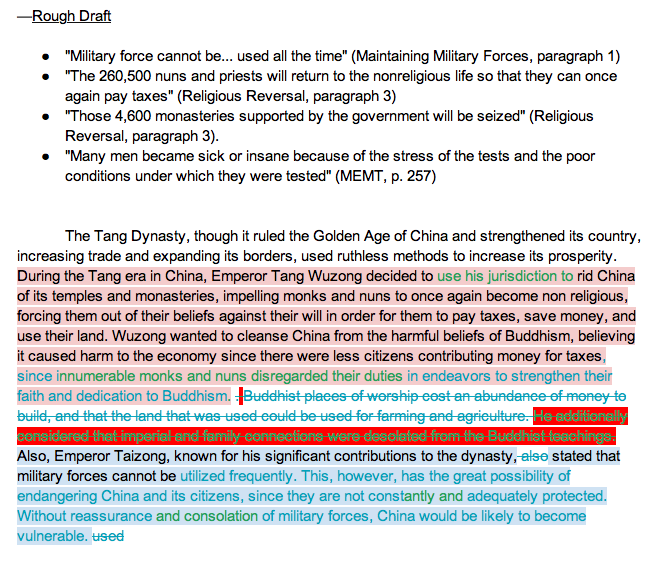
The picture I included here is one that I also posted on our class Instagram account which was pushed out to Twitter. I wanted to shout from the mountain tops that these students were writing JUST TO WRITE!
I’m not kidding.
I told all my students that they needed practice in how to write like a historian. Meaning…they needed to learn to cite evidence to support their statements. But more than that, they needed to be able to analyze primary and secondary sources in order to be able to effectively use them in their writing.
So I gave them three primary sources. I told them that as a group (self-selected) that they had to choose which Big Idea they wanted to prove: “The Tang dynasty used (ruthless/ingenious) methods to strengthen China’s government, expand its borders, and increase its economy.” I pushed the assignment out through Google Classroom. Then the students decided who was going to be the owner of the document and from there he/she shared the document with their peers.
The students then tackled the primary sources, annotating as necessary as they looked for evidence to prove their Big Idea. Some students started with bullet points, but others delved right into writing a full paragraph. It was a site to behold.
Now keep in mind, this was an optional assignment. Students are typically not required to do Level 4 (analysis/synthesis) or Level 5 (evaluation) writing assignments. Student choice for leveled learning opportunities is the crux of the history program at our school. We use a revised version of Marzano’s learning scales so that it’s VERY clear what students need to demonstrate mastery of in order to earn a specific grade.
Click HERE to go to a wiki resource that contains the learning scales for World History.
Students who want to earn an A or B in the history classes need to write and write well. As I tell students on their first day of World History, “We don’t give a lot of extra credit in our class. You will not pass this class with extra credit. You will, however, pass this class with blood, sweat, and tears…not necessarily in that order.” There’s always a bit of nervous laughter from students that follow.
The purpose of collaborative writing assignments is to give students practice in writing with their peers. And not just writing individual sentences strung together, but actually writing together in which they are actually editing each other’s posts and leaving comments for each other. This type of synchronous and asynchronous collaboration is exposing students to the 21st century classroom. Not only are students learning how analyze primary and secondary sources, but they are utilizing the thinking skills of a historian as they find evidence to prove their thesis or in this case the Big Idea. Students are not only practicing digital literacy skills but also History’s Habits of Mind. And we wouldn’t have it any other way.

 Living the Learning Curve